
Display, filter and sort flights (macOS)
Displaying flights
In the Pilot Logbook app on your Mac, select the Flights tab in the main sidebar.
If you can’t see the sidebar: Choose View > Show Sidebar.
- A table of flights is displayed which is automatically sorted by the most recent first.
- To sort flights by another column click on the column title. Click on the column title once more to reverse the order.
Displaying totals
In the Pilot Logbook app on your Mac, select the Flights tab in the main sidebar.
If you can’t see the sidebar: Choose View > Show Sidebar.
- Use the Flight/Simulator tab to select the summary of totals that you want to view.
- A relevant summary of totals is presented.
- When a filter is not applied a breakdown of flight total is given for the last 28 days, 12 months and the current year. This value is highlighted in red or green to indicate whether you are within or outside of the maximum flight time limitations set in Time Preferences.
Filtering flights and totals
Use the filter to limit the flights and totals that are displayed. Only flights that correspond to the applied filters will be displayed, and totals will be updated accordingly.
Any filters you set will persist across both Flights and Totals tabs until you disable them.
- With either the Totals or the Flights tab selected, open the Filters sidebar by clicking on the Filter button
 in the toolbar.
 - Toggle filters on and off using the Filters toggle at the top of the sidebar. When selected On any filters you have added will be activated and the Flights and Totals will be filtered accordingly.
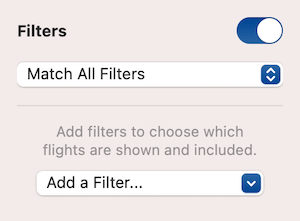
- Add a filter using the Add a Filter… dropdown menu.
- Select the type of filter you want to add.
- Specify the information you want to filter by.
- Delete a filter by pressing the Delete button
 next to the corresponding filter.
 Pilot Logbook